
Engineering still needs that as a DWG with the right dynamic blocks, so the drawing stays useful inside AutoCAD.
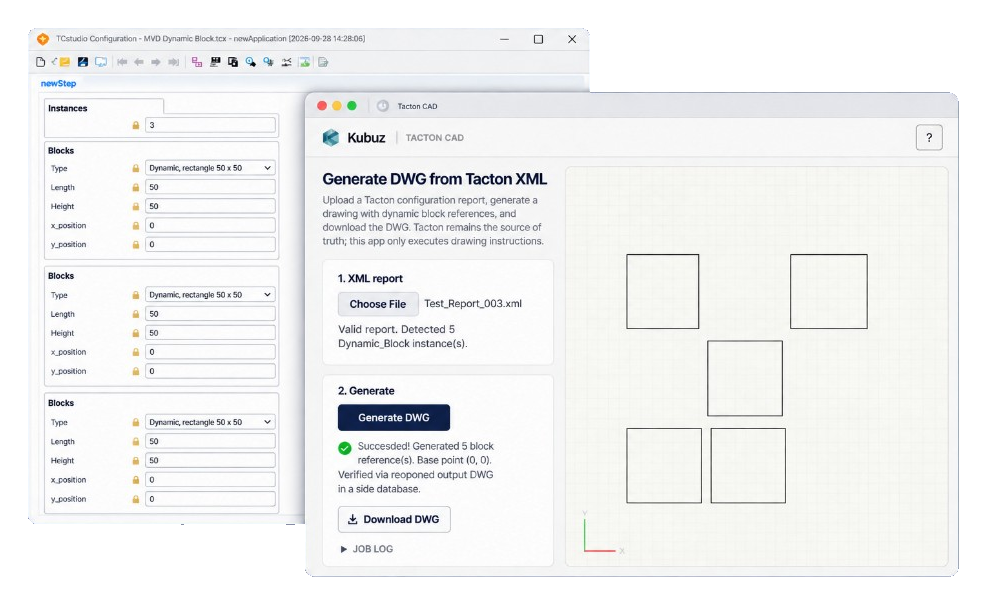
For a recent request I built a small local MVP to do that. It reads a Tacton XML report, maps each part to an AutoCAD block, and lets AutoCAD 2026 on the same PC generate the drawing.
Tacton remains the source of truth
With a generic "XML to CAD" connection, it is tempting to start deriving information from names.
If a generator sees something like Dynamic_rectangle 50 x 50, it could decide that this must be a 50 × 50 mm rectangle and draw that geometry itself.
That looks convenient, but it does not scale.
In the Tacton model, Dynamic_Block is the part. Rectangle or circle is the selected realization through realized-by. Length, Height, Radius and position are attributes of the configured part.
The drawing instruction is therefore already present in the configuration result.
The middleware only needs to translate which AutoCAD block belongs to this realization, which Tacton attributes drive which dynamic-block properties, and where the block should be inserted and rotated.
It does not need to decide again what the product means.
If realized-by were called Dynamic_rectangle 999 x 999, while the attributes say Length = 50 and Height = 50, the block becomes 50 × 50 mm. The name is a mapping key, not a geometry source.
Three layers, one machine
The architecture is small:
Tacton → XML report → middleware → AutoCAD 2026 Core Console + plugin → output.dwg
Everything runs locally on the same Windows PC.
| Layer | Role |
|---|---|
| Tacton | Configures the product and exports the report. |
| Middleware | Parses XML, maps parts, manages jobs, shows a preview and verifies the result. It never draws CAD itself. |
| AutoCAD 2026 | Creates the actual DWG through Core Console and a small .NET plugin. |
The browser preview is useful for the user, but it is not the authority. The saved DWG from AutoCAD is.
1. Configure in Tacton
The user completes the product configuration in Tacton.
Inside the XML report under /session/view/report, each relevant Dynamic_Block contains the information needed for drawing.
For this MVP that includes Length, Height, Radius, x_position, y_position, qty and realized-by.
Other session information, such as cookies, metadata and statistics, is not drawing input and is ignored.
The parser walks the report recursively and collects the configured blocks.
For this first version I only accept qty = 1. If Tacton needs two separate parts, I expect two parts in the report. The middleware does not invent arrays or additional placement logic.
2. Upload through a local web interface
The middleware runs as a small ASP.NET application on localhost.
The user uploads the Tacton report and the parser turns it into a simple internal job description.
The parser does not interpret dimensions from product names. It only reads the explicit attributes calculated by Tacton.
If Tacton places two parts at (0, 0), AutoCAD gets two parts at (0, 0). The application does not try to "tidy" the drawing automatically.
3. Map Tacton to AutoCAD through configuration
The connection between Tacton and AutoCAD is not hardcoded into the generator.
A catalogue in appsettings.json describes which realization uses which source file and which attributes map to which dynamic properties.
| Tacton | AutoCAD |
|---|---|
| Dynamic_Block + realization contains rectangle | Dynamic block from Dynamic Rectangle.dwg |
| Length, Height | Dynamic properties Length, Height |
| Dynamic_Block + realization contains circle | Dynamic block from Dynamic Circle.dwg |
| Radius | Dynamic property Radius |
| x_position, y_position | Insertion point in mm |
| optional rotation | Rotation around that insertion point |
Adding another block therefore mainly means adding another catalogue row, not rewriting the generator.
Attributes that do not belong to the selected variant are ignored. A rectangle may, for example, carry Radius = 0 in the report without the AutoCAD connection doing anything with it.
The source file is not the block name
One AutoCAD detail matters here: the filename of the supplied DWG is not automatically the name of the dynamic block inside AutoCAD.
Each supplied file contains a dynamic block, an enhanced block in newer AutoCAD terminology, placed on model space as a sample.
The plugin inspects the source file, imports the block definition, clears any remaining sample geometry and then inserts fresh block references for the Tacton instances.
The library DWGs themselves are never modified.
4. AutoCAD generates the drawing
Every generation gets its own job folder.
The required source DWGs are copied into that folder and hashed. AutoCAD therefore always works on job copies, never on the original library files.
AutoCAD Core Console then starts headless.
A small .NET plugin is loaded and executes one generate command. The plugin imports every unique dynamic-block definition required for the job, inserts one block reference per Tacton instance, assigns only the properties declared in the mapping, uses millimetres and scale 1, and saves the result as output.dwg.
Position comes directly from Tacton. The same is true for rotation when present.
There is no automatic layout engine in between.
5. Generate, then verify
Saving a file without an error is not enough.
After generation, the plugin reopens output.dwg and reads the inserted blocks back from AutoCAD.
The middleware then compares the request with the actual result: block count, insertion points, rotation, dynamic property values, and the geometric extents of the result.
AutoCAD reporting that a property is set to 50 mm does not prove that the resulting geometry is actually 50 mm wide. By reopening the saved DWG and measuring the extents, the system verifies the result rather than only the instruction.
The saved DWG is the proof.
The solution split into three parts
The code is kept in three layers.
TactonCad.Core
This layer has no dependency on AutoCAD.
It contains the XML parser, variant resolver, mapping and verification logic. That means this part can be unit-tested normally without launching AutoCAD.
TactonCad.App
This is the local ASP.NET application.
It handles the UI, uploads, job folders, mapping configuration and starting Core Console. For the MVP it processes one job at a time and uses ordinary files on disk.
No Docker, Redis, database or login.
That infrastructure would not add anything to the engineering problem at this stage.
TactonCad.Plugin
This is the small .NET component that actually runs inside AutoCAD.
Using NETLOAD and the TACTONGEN command, the same generation can also be tested directly. The plugin can inspect a source DWG, import blocks, generate the drawing and read the saved DWG back.
It is the only layer that needs to know AutoCAD.
Preview is separate from generation
Besides downloading the DWG, the local web interface also offers a canvas preview.
That preview is a convenience feature. It must never become authoritative.
For the MVP, a LibreDWG-based parser is used in the browser. An AutoCAD 2026 DWG containing dynamic blocks is not always easy for such a parser to open correctly. If the preview cannot read the file, the DWG download must still work.
AutoCAD remains the check.
If this ever becomes a closed product, the licence of such a preview component would also need to be evaluated separately. That is independent of the CAD generation itself.
The boundaries I keep
These are the boundaries of the solution.
Tacton configures. CAD executes. The middleware does not contain a copy of the product rules.
Mapping is data. Which block gets loaded comes from realized-by or an optional explicit CAD identifier, not from geometry the middleware tries to recognise.
Dynamic blocks stay dynamic. They are inserted and adjusted through their properties, not exploded into static polylines.
Millimetres, scale 1. Dimensions and positions are used as Tacton provides them.
No invented placement. If Tacton puts two parts at the same point, they stay there.
Library files remain library files. Generation always runs on copies.
Verification happens on the saved DWG. Not only on the values I tried to set.
What this MVP is and is not
This is a working local bridge on a Windows PC with AutoCAD 2026.
In the current test, one rectangular and one circular dynamic block are placed in the same DWG from a real Tacton report, using their configured dimensions and positions.
It is not a cloud CAD service, a multi-user portal, or a replacement for either Tacton or AutoCAD.
Another PC can run the same middleware, but AutoCAD 2026 has to be installed there as well.
For this MVP, that is an advantage rather than a limitation. The final DWG is produced by the same AutoCAD engine the customer already uses and trusts.
The core idea
The integration does not need to reinvent product configuration.
Tacton has already decided the choices and dimensions. The middleware translates that information, through an explicit mapping, into dynamic-block insertions. AutoCAD then creates the drawing engineering can open, verify and continue working with.